
Heads up: some of the links in this post are affiliate links. That means if you click and purchase, we may get a commission. It's how we keep this site running without cluttering it with ads.
A label maker earns its drawer space when it makes ordinary systems easier to maintain: pantry bins in a tight Toronto condo kitchen, freezer containers, totes of winter gear in a Calgary garage, charging cables, filing boxes in a Halifax home office, school supplies and shipping parcels. The best label maker in Canada is not automatically the one with the most templates or the lowest initial cost. Tape availability, the label format you need, power options and the effort required to create a label all matter over time.
This guide is a curated selection based on published product details, prices, ratings and large volumes of buyer feedback. The four picks take two broad approaches. The Nelko and NIIMBOT are pocket-sized Bluetooth printers that you run from a phone app, and both use pre-cut labels. The DYMO LetraTag is a classic handheld with its own keyboard and screen, and the DYMO LabelManager adds a QWERTY keyboard plus computer connectivity. Start with the labels you expect to make most often, then choose the machine that removes the most friction from that job.
Quick Overview: Our Top Picks
| Product | Best For | Why We Love It | Price |
|---|---|---|---|
| Budget-friendly wireless labelling | An affordable Bluetooth option for organizing common household items without a larger upfront investment. | $22.99 | |
| Starter home organization | Comes with three bonus tapes (paper, plastic and clear), so you can start labelling without a second order. | $71.98 | |
| Small, consistent labels | Pre-cut labels simplify repeated organizing tasks where compact, uniform stickers are especially useful. | $20.89 | |
| Frequent label creation | Rechargeable power, a QWERTY keyboard, and computer connectivity support more regular, flexible labelling. | $59.49 |
Nelko Bluetooth Label Maker
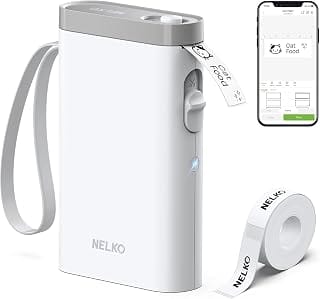
The Nelko P21 suits the household organizer who prefers creating labels from a phone instead of typing on a stand-alone device. Its Bluetooth connection is the key distinction, making it a logical pick for pantry bins, storage boxes, kids’ supplies and other projects where a mobile app-based workflow sounds appealing. It carries a 4.5 rating across 23,500 ratings, giving it a substantial buyer-feedback base for a budget model. The trade-off is dependence on a compatible phone and app: pairing, software updates and mobile-device availability become part of the routine. Its labels are also pre-cut to fixed lengths (such as 14 by 40 mm) rather than continuous tape, it doesn't connect to computers, and the listing notes it isn't compatible with Google phones running Android 14. Choose it for phone-first convenience, not for a fully self-contained labelling station. Buyers who want to label from a desk without reaching for a phone may prefer the physical QWERTY keyboard on the DYMO LabelManager 280.
Check Nelko Bluetooth Label Maker on Amazon for current availability.
Pros
- Bluetooth connectivity for phone-based label creation
- Includes tape
- 4.5 rating from 23,500 ratings
Cons
- Requires a compatible phone and app for its Bluetooth workflow
- Not the strongest fit for buyers who want a physical keyboard on the device
- Pre-cut labels only, with no continuous tape or computer support
DYMO LetraTag Label Maker
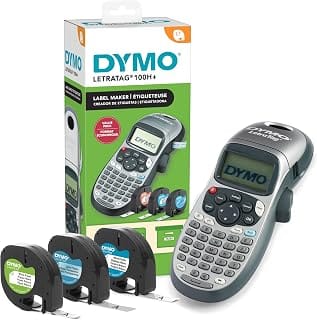
The DYMO LetraTag 100H is the straightforward choice for a home or office that wants a handheld label maker and enough included material to start organizing right away. Its three bonus labelling tapes are the practical differentiator, especially for first projects involving drawers, files, shelves and household bins. With a 4.6 rating from 43,100 ratings, it also has the largest rating count in this group. The compromise is that its listing emphasizes a handheld, easy-to-use approach rather than Bluetooth or computer connectivity. That is a benefit for buyers who want to avoid app setup, but less appealing for people who expect to create labels from a phone or desktop. It's also the most expensive pick here at $71.98, largely because of that three-tape bundle, and it runs on four AA batteries rather than a rechargeable battery. Prefer it for a self-contained, traditional labelling routine and a useful starter-tape bundle.
Check DYMO LetraTag Label Maker on Amazon for current availability.
Pros
- Handheld format for a self-contained workflow
- Includes three bonus labelling tapes
- 4.6 rating from 43,100 ratings
Cons
- No Bluetooth connection is identified in the listing
- No PC or Mac connectivity is identified in the listing
- Runs on four AA batteries, not a rechargeable battery
NIIMBOT Label Maker
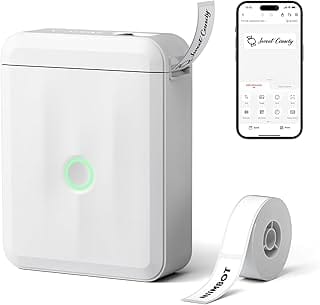
The NIIMBOT D110 is for buyers whose organizing system suits one small, repeatable sticker format. It comes with pre-cut 12 x 40 mm stickers, a sensible size for compact containers, drawer labels, small bins and other tidy, standardized applications. Like the Nelko, it has no keyboard or screen of its own: you design labels in the NIIMBOT phone app over Bluetooth. Basic features are free, but the full feature set needs a paid Premium membership, and the listing notes that PCs and tablets aren't supported. Its 4.6 rating from 20,900 ratings suggests broad buyer interest, while its format keeps the choice simple: use the supplied sticker size and focus on consistent names. That simplicity is also the limitation. A fixed 12 x 40 mm label is not ideal for a large tote, a long file description or any project needing a custom label length. Pick the D110 when uniform small labels are the goal. Choose one of the DYMO tape-based options instead if your household needs labels that vary widely in length and scale.
Check NIIMBOT Label Maker on Amazon for current availability.
Pros
- Includes pre-cut 12 x 40 mm stickers
- Compact fixed format suits uniform organization labels
- 4.6 rating from 20,900 ratings
Cons
- Fixed sticker dimensions limit layout flexibility
- Less suitable for large bins or unusually long label text
- Phone app required, and some features need a paid Premium membership
DYMO LabelManager
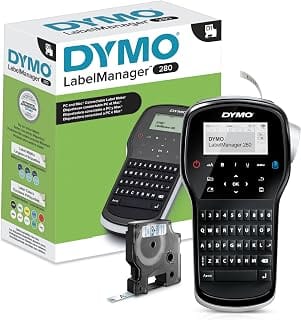
The DYMO LabelManager 280 is the most desk-oriented option here. It combines rechargeable operation, one-touch smart keys and a QWERTY keyboard with PC and Mac connectivity, making it a strong match for a home office, filing project or recurring equipment-labelling task. The physical keyboard is its clearest advantage for buyers who want to type directly on the unit, while computer compatibility gives it another path for desktop work. It has a 4.4 rating from 4,800 ratings. The trade-off is focus: these features make more sense for frequent office-style labelling than for the occasional jar or toy bin. Buyers seeking the lowest-complexity compact label solution may find a basic handheld or fixed-sticker model more appropriate. Prefer this DYMO for flexible input options and rechargeable convenience.
Check DYMO LabelManager on Amazon for current availability.
Pros
- Rechargeable portable design
- QWERTY keyboard and one-touch smart keys
- PC and Mac connectivity
Cons
- 4.4 rating is lower than the other listed picks
- Its office-oriented features may be more than occasional household labelling requires
How to choose the best label maker in Canada
Begin with the job, not the machine. A household organizing pantry jars and storage totes may value quick, readable labels above all else. A home office that regularly marks files, cords and equipment may benefit from a keyboard and more deliberate text entry. For shipping or repeated inventory stickers, a fixed pre-cut format can be efficient if its dimensions suit the task.
Make a short list of surfaces and label sizes before buying. Measure narrow cable flags, binder spines, food containers and shelf edges rather than guessing. Then decide where you want to compose labels: on the unit itself, on a phone or at a computer. This choice affects daily convenience more than a long feature list.
Canadian buyers should also check replacement tape listings before committing. Confirm that the format is sold by Canadian retailers, identify the tape width or sticker dimensions required, and consider how many labels a typical project consumes. A low-cost machine is less appealing if its supplies do not match the labels you need.
Types of labels and label materials (and when to use them)
Label format is the first practical fork in the road. Continuous tape is useful when the required label length changes from item to item: a short spice jar label, a longer bin description or a detailed folder name. Pre-cut stickers make more sense when every item needs the same compact label, such as small storage boxes, pantry containers or identical stock items.
Material matters as much as shape. Paper-style labels suit dry, low-contact indoor uses. For a refrigerator, freezer, bathroom, garage or anything cleaned frequently, read the cartridge description closely for water resistance, temperature guidance and recommended surfaces. Do not assume a label marketed for general organization will tolerate moisture, cold or abrasive cleaning.
Smooth, clean and dry surfaces give adhesive labels their best chance. Textured plastic, fabric, dusty bins and curved containers are less predictable. When labels must remain readable for months, buy a small supply first, apply a few in the intended location and assess the manufacturer’s stated material and adhesive guidance before standardizing on that tape.
Connectivity and setup: USB, Bluetooth, and mobile apps
Bluetooth label makers put layout work on a phone, which can be handy for longer names, repeated templates and labels created while walking around the house. The trade-off is that printing depends on a compatible mobile device and the associated app. Before purchase, check the current app requirements, supported operating systems and the permissions it requests.
A handheld model keeps the process self-contained. That can be preferable in a utility room, classroom or office where a phone is not always nearby. It also avoids app updates, account prompts and wireless pairing. The limitation is usually slower entry for long text, especially if the device has fewer physical controls.
USB or computer connectivity is useful for people who create labels from a desk and already keep names, asset lists or filing systems on a PC or Mac. It is not automatically better for casual kitchen organization. Choose the setup that matches where labels are actually made. A feature that sounds advanced can become an unnecessary step if you only print a few short labels each month.
Print quality, font options, and label size/format
Legibility is the real measure of print quality for home organization. A label should still make sense from the distance at which you grab a bin or scan a shelf. Short, specific names usually beat tiny text packed with detail: “Baking tools” is clearer than a long list of every utensil inside.
Label width controls what is practical. Narrow labels work for cables, small jars and folders, but they constrain font size and multi-line text. Wider formats suit bins, storage totes and office equipment. Pre-cut labels remove size decisions but impose a fixed canvas; the NIIMBOT D110 listing, for example, specifies 12 x 40 mm stickers. That can be a sensible fit for compact organization, not a universal format.
Fonts, symbols and borders can help sort categories, but restraint pays off. Use one naming style, a readable font and consistent capitalization. If several people share the space, plain language is more valuable than decorative layouts. Check the machine’s stated label options before planning a system around icons, multiple lines or unusually long names.
Durability and adhesion: indoor vs. outdoor and specialty surfaces
Indoor labels on clean shelving are the easy case. Kitchens, laundry areas, garages and entryways introduce moisture, temperature swings, handling and cleaning products. The label maker alone does not determine durability; the specific tape or sticker material does. Read the replacement-supply listing for its surface, water, heat and cold claims, then match it to the intended location.
For pantry containers and cabinet bins, clean residue from the surface and let it dry before applying a label. On freezer containers, avoid assuming that ordinary organization labels will remain attached through condensation and cold unless the tape documentation says so. For outdoor equipment, address labels and frequently handled tools, select a material explicitly intended for those conditions. That goes double for an unheated garage or shed in Saskatoon or Edmonton, where winter temperatures can sit below -30 °C for days.
Adhesion can also be a downside. A permanent-looking label may leave residue on rented storage furniture, reusable jars or containers that change purpose often. In those cases, use a small removable area, label the bin instead of every item, or choose supplies described for temporary use. A thoughtful placement choice can save more trouble than a stronger adhesive.
Cost considerations in Canada: cartridges, tapes, and long-term value
The purchase price is only the first line of the budget. A label maker creates an ongoing supply commitment, so check replacement-tape or sticker pricing, package quantity and availability from Canadian sellers. Compare labels of the same width, length and material rather than simply comparing cartridge prices. A larger roll can be better value, but only if it will be used before your system changes.
Starter supplies matter for a first project. The DYMO LetraTag 100H listing includes three bonus labelling tapes, which gives a new owner material to begin with rather than requiring an immediate second order. That is useful, though the relevant long-term question remains the cost and range of replacement supplies that fit the machine.
Avoid buying too much specialty tape before proving it suits the job. A basic black-on-white option is often the most practical starting point for labels that need broad readability. Add colours, specialty finishes or alternate widths when a real category calls for them. Keep a note of the exact tape family and size used by your machine; that small record prevents incorrect cartridge orders later.
Top use cases by scenario (home, office, small business, and shipping)
For home organization, prioritize a simple workflow and labels that fit the containers already in use. Bluetooth can suit people who want to type names on a phone, while a stand-alone handheld unit suits those who prefer to keep the task device-free. Small pre-cut stickers are practical for uniform jars, drawers and compact bins.
A home office needs labels that can be made repeatedly without disrupting work. A physical keyboard is useful for people who label folders, cords, chargers and storage boxes from a desk. If cords are the main headache, labels work best alongside a few of the desk cable organizers we recommend. Computer connectivity can also be worth considering when label text originates in a PC or Mac workflow. Keep the naming system consistent: dates, file categories and equipment names should follow one pattern.
For a small business, separate short-term shipping labels from internal organization labels. If the Canada Post rotating strikes pushed you toward courier services, check each carrier's label size requirements as well. Verify the required label size, adhesive and format for each use before selecting a machine. A compact label maker may be excellent for inventory bins, cables and office supplies but not suited to every parcel-label requirement. Match the machine to the repeatable job, not to an imagined all-purpose role.
What to look for in warranty and customer support
Check the manufacturer’s current Canadian warranty terms before ordering, including the warranty period, the process for making a claim and who pays shipping if service is needed. Keep the order confirmation, serial number if applicable, packaging details and a photograph of any issue. Those basics make a support request much easier.
For app-connected or computer-connected units, support also means software maintenance. Confirm that the relevant app or desktop software is currently available for your phone, PC or Mac, and read recent user feedback for recurring setup concerns. Compatibility can change as operating systems update.
Replacement supplies are part of support in practice. A machine from a recognizable label family can be easier to live with when compatible tapes remain easy to identify and purchase. Read product questions carefully, but give greater weight to the manufacturer’s compatibility information. If a listing is vague about which tape family fits, pause before buying extra cartridges.
Frequently asked questions about label makers in Canada
Which label maker suits organizing a Canadian home most affordably?
The NIIMBOT D110 and Nelko P21 are both budget picks under $25 that print pre-cut labels from a phone app over Bluetooth. The NIIMBOT includes 12 x 40 mm stickers, a format that suits small bins, jars and drawers when one label size is enough, though some app features need a paid Premium membership. Affordability over time depends on replacement label costs, so check compatible supplies before choosing.
Is Bluetooth more convenient than a handheld keyboard for home labelling?
Bluetooth is convenient when a phone is already in hand and you want to type names in an app. A handheld keyboard is often simpler for quick labels without pairing or app setup. The better choice comes down to where labels are made: phone-based entry suits app users, while a self-contained unit keeps the job independent of a mobile device.
Are pre-cut stickers or label tapes better for quick organization?
Pre-cut stickers are faster when many items need the same label dimensions. The NIIMBOT D110 and Nelko P21 both use this fixed-format approach; the NIIMBOT ships with 12 x 40 mm stickers. Label tapes offer more flexibility when label lengths vary across jars, bins, folders and cables. Choose stickers for repeatable small labels and tape when you need to tailor the length.
Does rechargeable operation matter for frequent home and office use?
It can. Rechargeable operation reduces the need to keep disposable batteries on hand, which is helpful for a label maker used frequently at a desk or around a busy home. The DYMO LabelManager 280 is identified as rechargeable. For occasional labels, input method, tape availability and label format may matter more than the power source.
How should Canadian buyers compare tape costs for long-term value?
Compare compatible supplies by usable label quantity, width, length and material, not cartridge price alone. Check availability from Canadian retailers and confirm that the tape family fits the exact model. Factor in the label conditions as well: a less expensive indoor tape is poor value if the job requires a material intended for moisture, cold or frequent handling.