

Heads up: some of the links in this post are affiliate links. That means if you click and purchase, we may get a commission. It's how we keep this site running without cluttering it with ads.
At a compact Toronto condo desk, plugging in a laptop, monitor, phone and power bar can turn into a four-cable tug-of-war before the first email is answered. Cords loop around chair wheels, chargers slip behind the desk and bulky adapters hang in plain sight. The same problem shows up in Vancouver apartments and shared workplaces: loose cables look messy, snag easily and are frustrating to reach when one connection comes loose. For anyone refining a sit-stand setup, our best standing desks in Canada guide pairs naturally with a plan for keeping wires under control.
The best cable organizers for desk setups match the clutter, not just the furniture: small adhesive clips keep daily charging leads within reach, while clamp-on under-desk trays hide power bars, laptop bricks and monitor cords without drilling holes. Prices run from under $9 for basic routing clips to roughly $58 for larger systems. Based on specifications, current pricing and third-party ratings, the Xpatee No-Drill Under-Desk Cable Tray is our top pick: at $18.99 CAD, its clamp-on design and 4.6-star rating from more than 2,600 reviews make it a practical answer for medium-to-heavy cable clutter.
Quick Overview: Our Top Picks
| Product | Best For | Why We Love It | Price |
|---|---|---|---|
| No-drill desk setups | Clamp-on design manages computer cords without drilling or screwing into desks. | $18.99 CAD | |
| Multiple cable runs | Fifty adhesive clips provide extensive cable organization for desktops, televisions, and home offices. | $17.95 CAD | |
| Wide or multi-desk setups | Three 44 cm steel trays cover a wide desk or multi-monitor setup. | $57.99 CAD | |
| Frequently moved cables | Locking spring clips are designed to hold cables while allowing convenient removal and repositioning. | $16.99 CAD | |
| Tight budgets | Fifty small clear clips route single cords along a desk edge without standing out. | $8.98 CAD |
Xpatee Under-Desk Tray
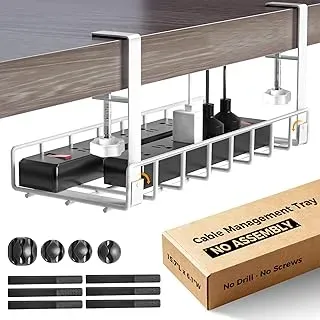
Clamp-on installation is the standout here: the Xpatee Under-Desk Tray manages computer cords without drilling or screws, making it a sensible choice for rented home offices, shared workstations, or desks you do not want to mark up. Its metal enclosure comes as one white piece and creates an out-of-sight home beneath the desktop instead of adding another organizer to the work surface. That matters when computer and charging cables snag easily or make a compact workspace look busy. Designed for indoor use, it also includes a two-year manufacturer warranty. At $18.99, its 4.6-star average from 2,600 customer ratings makes it our top pick for practical no-drill cable containment; the clamps fit desktops 1 to 6 cm thick, so measure yours first.
Pros
- No-drill clamp installation helps protect desk surfaces
- Metal enclosure keeps computer cords below the desktop
- Strong 4.6-star rating from 2,600 customer reviews
Cons
- Clamps only fit desktops 1 to 6 cm (0.4 to 2.4 in) thick
- At 40 cm long, one tray may not span a wide multi-monitor desk
SOULWIT Cable Clips
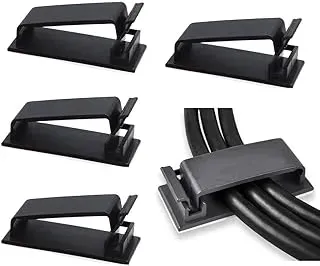
For a desk with several separate cable runs—computer leads, Ethernet, charger cords and TV wiring—the SOULWIT Cable Clips offer more coverage than a small pack of surface holders. The box contains 50 self-adhesive clips, making it a sensible pick for a home office, media centre or shared workstation where cords need individual routes rather than one under-desk bin. Each clip measures 46 x 18 mm and is made of nylon, with room for several cables per clip. At $17.95, the large count is the main appeal for Canadians tidying multiple desks or devices. Its 4.5-star rating from 12,000 reviews also suggests broad buyer confidence.
Pros
- 50-piece pack suits multiple separate cable runs
- Self-adhesive installation avoids drilling into desk surfaces
- Compact 46 by 18 mm clip dimensions
Cons
- Not designed to contain power bars or bulky bundles
- Individual clip placement takes time for large setups
PAMO Under-Desk Organizers
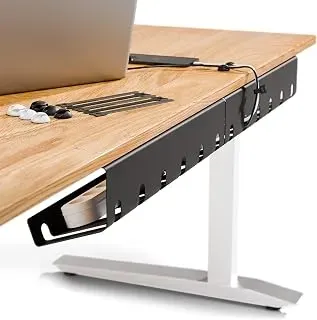
At $57.99, this is the spend-more option for desks where cable clutter extends beyond one small area. The PAMO under-desk set includes three pieces, giving it broader coverage than a single tray for separating computer cords, chargers and power-bar leads under a larger workstation. Each tray is 1 mm powder-coated steel with a bevelled front edge, so power bars and laptop bricks stay reachable. It carries a 4.6-star rating from 2,300 customers, plus a 100-day return policy and two-year manufacturer warranty. Each tray measures 44 x 10 x 12 cm and screws into the underside of the desk (screws included), so this is the one pick here that isn’t no-drill. Skip it if you rent or don’t want holes in your furniture.
Pros
- Three-piece set covers more under-desk space
- Alloy-steel enclosure material suits permanent workspace organization
- Two-year manufacturer warranty adds useful reassurance
Cons
- Costs considerably more than compact single-tray alternatives
- Screw-in mounting means drilling into the desk underside
Lamicall Spring Cable Clips
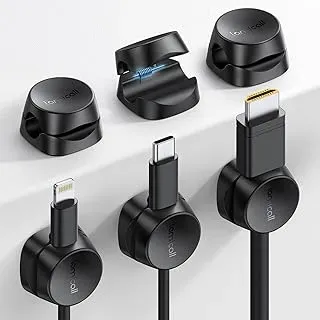
Unlike under-desk trays that hide a bundle of cords, these compact spring clips keep the cables you reach for on the desk edge or nightstand. The six-piece Lamicall set uses a one-second locking spring design intended to hold a cord while still letting you pull it out and return it without reorganizing the whole workspace. That makes these spring cable clips a sensible pick for phone chargers, headset leads and other frequently moved cables, rather than a crowded power bar and computer-cable bundle. At $16.99, it sits in the middle of this guide’s compact-organizer range and has a 4.5-star average from 2,800 ratings. It suits desks where easy cable access matters more than hiding everything.
Pros
- Spring lock supports quick cable removal and repositioning
- Six clips organize several frequently used leads
- Adhesive mounting avoids drilling into the desk
Cons
- Not intended to contain power bars or large cable bundles
- Desk-surface clips leave cables visible
Aujzoo Adhesive Cable Clips
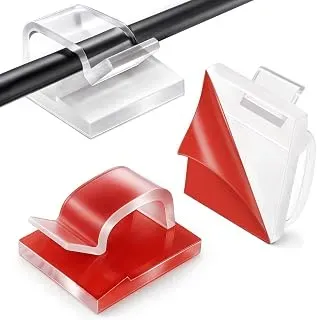
Fifty self-adhesive clips give this set its clear advantage: plenty of small routing points for the lowest price in this guide. The Aujzoo CP01 clips are small and clear, making them a compact choice for guiding individual charging leads along a desk edge, wall, or nearby work surface. At $8.98, this is a sensible budget pick for a home office with scattered phone, laptop, or accessory cables rather than a large bundle needing under-desk containment. Adhesive installation avoids drilling into a desk, which suits renters and shared workplaces. Its 4.1-star rating from 983 customers suggests solid appeal, though adhesive clips depend heavily on a clean, suitable mounting surface.
Pros
- 50-piece set covers several small cable-routing jobs
- Adhesive mounting avoids drilling into desks or walls
- Low price suits tight workspace-organizing budgets
Cons
- Not designed to contain large power-bar or computer cable bundles
- Adhesive hold can vary with surface condition
Cable Clips vs Under-Desk Trays: Which Desk Cable Organizer Works Better?
Desk-surface clips keep individual charging leads, headset cords and USB cables within reach, making them the better fit for a small desk with only a few frequently used wires. The Aujzoo 50-pack costs $8.98, so it is a sensible low-cost starting point for light cable tidying. Adhesive clips do have limits: their hold can depend on surface preparation, and a crowded desk can still look busy when every cable remains on top.
Under-desk trays tackle the larger mess: power bars, laptop bricks and bundled monitor or computer cables. The Xpatee clamp-on tray, our top pick at $18.99, provides higher-capacity containment without drilling into the desk. That suits renters, shared workplaces and anyone protecting a finished desktop. It can make reaching a power bar less convenient than surface clips, though. Choose clips for a few grab-and-go cords; choose a tray when the clutter includes power equipment.
What Does Spending More on Desk Cable Organizers Actually Buy You?
The real entry point is under $9, but low-cost adhesive clips are best treated as cable guides rather than a full cable-management system. They can be genuinely enough for a bedside charger, one monitor cable or a tidy laptop station. Spending around $17 to $19 brings more specialized options, including the Lamicall spring clips at $16.99 and SOULWIT’s 50-piece adhesive set at $17.95. These make more sense when cable access matters as much as hiding wires.
At $18.99, the Xpatee tray is the value sweet spot for a desk with a power bar, charger blocks and several computer cords: it addresses the source of the clutter instead of simply routing loose ends. Spending closer to $58 on the PAMO set of three buys broader coverage across a larger workstation or multiple desks, not necessarily a better choice for one compact setup. Adhesive products may need replacing if pads lose grip, while clamp trays avoid that particular ongoing cost. Both trays carry a two-year manufacturer warranty, so paying more for the PAMO set buys coverage area, not longer protection.
Clips, Trays and the Details That Keep Cables Manageable
Desk-Surface Routing Versus Under-Desk Containment
Start by identifying the kind of disorder you need to fix. Small adhesive clips are best for one or two cables that must stay accessible: a phone charger beside a monitor, a headset lead, or a laptop power cord running along the desk edge. The SOULWIT set includes 50 clips for $17.95, while the Aujzoo 50-pack is a budget-friendly $8.98 option for routing cords across several desk stations. An under-desk tray makes more sense for a desktop computer, monitor cables and a power bar. The Xpatee tray is the strongest value choice for larger cable bundles, keeping the main tangle below the work surface rather than merely directing individual leads.
No-Drill Installation and Desk Protection
Many Canadian shoppers work from rental apartments, condo bedrooms, shared offices or employer-provided desks where drilling holes is not practical. With a BC union pushing for more remote work to cut commuting costs, home desks aren’t going anywhere, and neither are the cords behind them. Clamp-mounted organizers avoid permanent modifications and can be a better fit for desks made from laminate, veneer or finished wood. The Xpatee tray is specifically designed to install with clamps rather than screws or drilling, making it a sensible first choice for people who want to protect the desk surface. Before buying, check the underside and back edge of your desk for a usable clamping area. Drawers, support bars and unusually thick desktop edges can limit where a tray can sit.
Capacity for Power Bars, Chargers and Computer Cords
Capacity matters more than the number of visible cables. A simple laptop setup may only need clips for a charging cable and monitor lead, but a full workstation can include a power bar, docking station, display cables, Ethernet, speakers and several charging cords. Choose an under-desk organizer when the goal is to gather that central bundle in one place. The PAMO Cable Management Under Desk set of three, priced at $57.99, suits larger work areas or multi-desk arrangements where several cable routes need attention. For one typical home-office desk, a single Xpatee tray provides a more economical starting point without turning the desktop into a permanent project.
Adhesive Strength and Placement Planning
Adhesive cable holders are convenient, but they need a clean, dry mounting surface to have the best chance of staying put. Plan the route before peeling the backing: place clips where cables naturally travel, not where they need to bend sharply. This is especially useful on standing desks, bedside workstations and compact desks in Toronto condos or Vancouver apartments, where every centimetre of surface space counts. The Lamicall Spring Cable Clips Holder comes in a six-pack for $16.99 and is designed for easy cable insertion and removal with its “1s Lock” style. It is a practical choice for chargers that are unplugged and reconnected frequently, rather than hidden away permanently.
Access Matters as Much as a Tidy Appearance
A good setup should not bury the cables you actually need. Keep daily-use charging leads near the desktop edge, route less-used cords behind the monitor, and reserve an under-desk tray for bulkier items that rarely move. This division makes troubleshooting easier when a monitor, laptop charger or power bar needs attention. For a modest clutter problem, 50 self-adhesive clips may provide better value than a large tray. For a desk with several connected devices, clips alone can create a neat-looking but still crowded cable path. Combining a clamp-on tray with a few accessible clips is often the most practical arrangement for a clean, flexible workspace year-round.
Frequently Asked Questions
Should I choose desk-surface clips or an under-desk cable tray?
Choose clips for one or two frequently handled leads, such as a phone charger or headset cable. They keep ends from falling behind the desk and make unplugging quick. Choose an under-desk tray when a power bar, monitor leads and computer cords are creating the main mess. The Xpatee Under Desk Cable Management Tray is the stronger fit for that job because its clamp mount contains a larger bundle without drilling into the desk.
How do I know a cable organizer will fit my desk and cable setup?
Measure the usable underside of the desk, not just its total width. Check for drawers, crossbars, metal frames and a lip that could block clamp placement. For clips, confirm the channel suits the thickness of your charging and computer cables; thick power cords may not sit securely. Plan room for plug heads and power-bar switches, too. A tray should hold the bulky hardware, while surface clips guide only the cables you need to grab daily.
How can I make adhesive cable clips last longer?
Adhesive clips depend heavily on surface preparation. Wipe away dust, oils and cleaner residue, then let the area dry fully before applying pressure. Use them on smooth, stable surfaces rather than textured particleboard edges or peeling finishes. Avoid loading a small clip with a heavy extension cord; reserve it for lighter charging, Ethernet or peripheral leads. The SOULWIT self-adhesive clips are best placed where cables have gentle bends, not constant hard pulls.
What is a sensible budget for compact desk cable organizers in Canada?
Expect simple adhesive clips to start below $9, while larger trays and multi-piece under-desk systems can reach about $58. Spend according to clutter, not desk size alone. A small laptop-and-phone setup usually needs a few clips; a workstation with a power bar, monitor and docking cables benefits more from contained under-desk storage. For most busy desks, one clamp-on tray is the best place to start.
What maintenance keeps cables tidy and easy to access after installation?
Once every few months, remove dust from the tray or clips and check that no cable is pinched, sharply bent or hanging near chair wheels. Label power adapters if several look alike, and leave a small service loop so a device can move without pulling on a connector. Do not overfill a tray: crowded cords trap heat and make troubleshooting harder.
Choose the Right Compact Cable Organizer for a Cleaner Canadian Desk
For most Canadian desks, the clear pick is the Xpatee Under-Desk Tray. At $18.99, it pairs a 4.6-star rating from 2,600 reviews with a no-drill clamp design that keeps a power bar, charging bricks and the usual laptop or monitor cords off the desktop. It is the right choice for a home-office setup with several cables hanging behind the desk, especially if you rent, share a workspace or simply do not want to make holes in the furniture.
Not every desk needs a tray. The SOULWIT Cable Clips make more sense for lighter jobs: guiding a phone charger along the desk edge, separating USB leads, or keeping a frequently used cable within reach. At $17.95, the 50-piece set offers plenty of placement options, but clean and dry the mounting surface first and avoid relying on adhesive clips to carry heavy power cables. Adhesive is best for routing, not major cable containment.
For a larger workstation or a desk with more extensive wiring, the PAMO Under-Desk Set is worth considering. Its set of three organizers costs $57.99 and suits people who want to divide cords across a wider desk rather than crowd everything into one spot. Just note it screws into the desk rather than clamping on.
Before ordering, take five minutes to count your plugs, chargers and cables—and measure the desk edge or underside where the organizer will sit. Choose a tray for power bars and cable bundles; choose clips for access and direction. Start with the clutter you reach for every day, then give the rest a proper home.
Sign up for The Canada Report
Your modern digest of Canadian news. Friendly, clear, and in your inbox.
No spam. Unsubscribe anytime.