


Heads up: some of the links in this post are affiliate links. That means if you click and purchase, we may get a commission. It’s how we keep this site running without cluttering it with ads.
In a Calgary condo, the morning is quiet. Fresh snow outside mutes the street noise, and soft light slips around half-drawn blinds. It's -18°C, with windchill pushing closer to -25°C, but inside, there's no fumbling for glasses or squinting at tiny smartphone icons.
"Alexa, good morning."
The overhead lights ease up to 30%. The kettle clicks on. A calm voice responds: "Today in Calgary, it's cold and clear. You have a doctor's appointment at 10 a.m."
On the sideboard, a large 8-inch dementia clock displays the date and time in bold, unmistakable letters—Wednesday, February 12, 2025, 7:30 AM, Morning. That familiar "What day is it again?" anxiety never even starts.
On a rainy February morning in Victoria, a senior with arthritis shuffles into the kitchen, hands too stiff and sore to grip a phone. "Hey Google, play CBC Radio One Victoria." The room fills with familiar voices and local news—no buttons, no pain.
In Toronto, a granddaughter in Hamilton taps her phone and drops in on Grandpa's Echo Show. "Did you take your pills yet?" she asks gently. He grins at the screen. "Just did." A quick video check-in that eases her mind without the two-hour round trip.
And on a brutal -30°C night in Winnipeg, when feet hit the cold floor at 2 a.m., hallway lights ease on automatically—no fumbling for switches in the dark, no risk of tripping. Motion sensors guide the way to the bathroom and back. One smart routine preventing falls when it matters most.
Across Canada, more than 7 million people are now 65 or older, and many want exactly the same thing: to stay independent, safe, and connected in the homes they love—without battling tiny screens or complex menus. Voice-controlled devices for seniors are quietly becoming the extra set of hands, eyes, and ears that never get tired. From the best Alexa for seniors in Canada to senior-friendly smart devices like dementia clocks and amplified phones, today’s smart home devices for elderly Canadians aren’t about tech for tech’s sake. They’re about saying “Turn on the lights” instead of searching for a switch, getting medication reminders out loud, and knowing help is just a voice command away.
Quick Overview: Our Top Picks
| Product | Best For | Why We Love It | Price |
|---|---|---|---|
| Hands-free home assistance | Clear Canadian weather, news, and music on voice command, even in small rooms. | $69.99 CAD | |
| Whole-room music lovers | Integrated microphone allows seniors to answer video calls, give voice commands, and stay connected without touching a button. | $368.98 CAD | |
| Building a voice-controlled home | Connects many smart devices so seniors can manage lights and alarms by voice. | $41.99 CAD | |
| Front-door safety and monitoring | Auto shows who's at the door, giving seniors instant, hands-free peace of mind. | $279.99 CAD | |
| Memory support and routines | Large, clear display and reminders help seniors stay oriented and on schedule. | $55.99 CAD | |
| Low-vision, hard-of-hearing callers | Extra-loud ringer, big buttons, and photo dialing make staying connected effortless. | $223.96 CAD |
Amazon Echo Dot (newest model), Vibrant sounding Alexa speaker, Great for bedrooms, dining rooms and offices, Charcoal, with Alexa+ Early Access
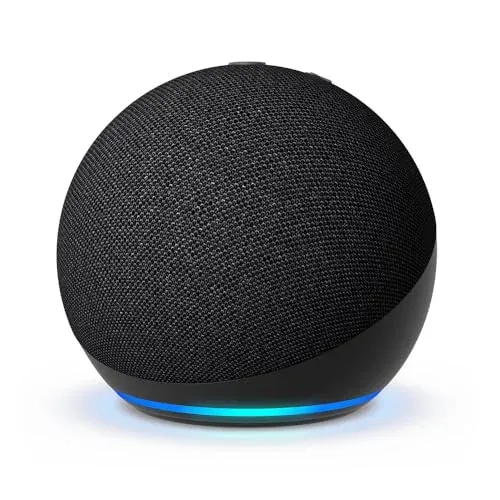
The latest Echo Dot is a compact, senior-friendly smart speaker that works well in Canadian homes, especially smaller spaces like condos or bedrooms. It’s roughly the size of a small grapefruit, with a rounded fabric-covered shell in a neutral charcoal colour that blends into most décor. For its size, the sound is surprisingly full, with clearer voices and deeper bass than earlier Echo Dots—handy for seniors who need louder, cleaner speech for news, radio, and audiobooks. As one of the most popular voice-controlled devices for seniors, it can play your favourite stations from CBC, Spotify, or Amazon Music, set hands-free timers in the kitchen, and call family using just your voice. Built‑in temperature and motion sensors can trigger smart home devices for elderly Canadians, like turning on a light when you walk into a dark hallway on a winter morning.
Pros
- Clearer vocals and louder sound than previous models
- Very compact size fits easily on nightstands or counters
- Simple voice controls make it senior-friendly for daily tasks
Cons
- Requires Wi‑Fi and smartphone app for initial setup
Bose SoundLink Revolve+ (Series II) Portable Bluetooth Speaker - Wireless Water-Resistant Speaker with Long-Lasting Battery and Handle, Black
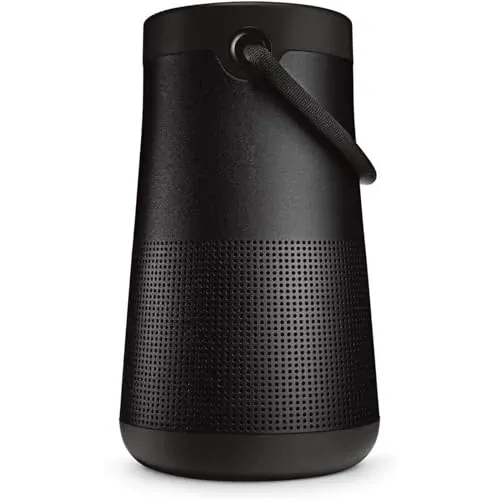
The Bose SoundLink Revolve+ Series II is a premium Bluetooth speaker that pairs beautifully with voice-controlled devices for seniors. Think of it as an audio upgrade for your Echo Dot or Google Home for seniors, giving you clearer, richer sound that’s easier for older ears to hear. It delivers true 360° sound from a compact cylinder roughly 18 cm tall, with a sturdy aluminium body and a flexible fabric handle that’s easy to grab. With up to 17 hours of battery life, it’s ideal for all-day listening—whether it’s CBC Radio, audiobooks, or voice assistants for seniors answering questions. The IP55 rating helps it stand up to dust and splashes, so it’s fine on a condo balcony or cottage deck. For Canadian seniors who want senior-friendly smart devices with premium sound, this is a very polished option.
Pros
- Rich, 360° sound that’s clear even at low volumes
- Easy-carry handle makes it senior-friendly around the home
- Excellent 17-hour battery life for all-day listening
- Pairs seamlessly with Alexa or Google Assistant devices
Cons
- More expensive than many smart home speakers
- Micro-USB charging feels dated for a premium device
Aqara Smart Hub M2 (2.4 GHz Wi-Fi Required, Not Support Wi-Fi 6), Smart Home Bridge for Alarm System, IR Remote Control, Home Automation, Supports Alexa, Google Assistant, Apple HomeKit and IFTTT
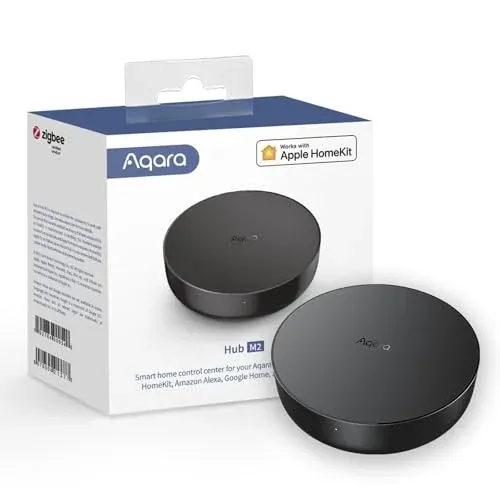
The Aqara Smart Hub M2 is a budget-friendly way to bring voice-controlled devices for seniors into one simple, central hub. About the size of a small hockey puck (8.8 × 8.8 × 2.5 cm) and powered by USB, it tucks neatly beside the router or TV without adding clutter. It connects on 2.4 GHz Wi‑Fi and can manage up to 128 Aqara Zigbee devices, so you can build out senior-friendly smart devices over time. A standout feature for Canadian seniors is the 360° infrared control: it can turn many older TVs, cable boxes, and fans into voice-activated devices for elderly users through Alexa or Google Home for seniors. The built-in speaker can double as a basic alarm or door chime, handy in quieter homes or condos. For reliability during Canadian winters, it also supports Ethernet, which helps keep smart home devices for elderly relatives online even when Wi‑Fi is spotty.
Pros
- Very affordable hub for starting a smart home setup
- Controls older TV and fan remotes via 360° infrared
- Works with Alexa, Google Assistant, Apple HomeKit and IFTTT
- Ethernet option for a more stable, reliable connection
Cons
- Only works with Aqara Zigbee child devices, not other brands
- Requires 2.4 GHz Wi‑Fi and fairly close router placement
eufy Security eufy Smart Display E10, Smart Home Hub, 8" Control Panel, Compatible Devices, Four Views on One Screen, Instant Door Alerts, Daily Event Reports, One Tap Control
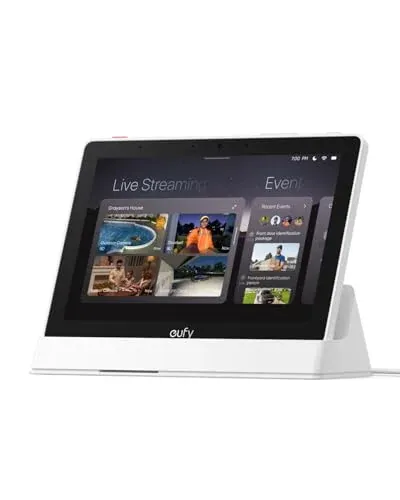
The eufy Smart Display E10 is a premium, senior-friendly smart hub that works beautifully as the “command centre” for voice-controlled devices for seniors. The 8-inch touchscreen is bright and easy to read, even in daylight, and the interface is stripped down enough that less tech-savvy users won’t feel overwhelmed. Paired with eufy cameras and doorbells, it gives instant hands-free door alerts, making it great for Canadian seniors who want to see who’s at the door. You can view up to four security cameras at once, which is handy for monitoring front steps, backyard, and condo lobby together. Local storage means faster playback and no dependence on spotty rural internet. While it’s not a voice assistant itself like the best Alexa for seniors Canada offers or Google Home for seniors, it complements those voice-activated devices for elderly users as a strong visual security hub.
Pros
- Large 8-inch touchscreen is bright, clear, and senior-friendly
- Hands-free door alerts reduce rushing to the door
- Four-camera view is excellent for monitoring larger properties
- Local storage gives instant playback without buffering or subscriptions
Cons
- Works best if you already use eufy security cameras
- Premium price compared to basic smart home displays
Dementia Clock for Seniors, 8-Inch Digital Clock with Large Display, 12 Alarm Reminders, Auto-Dimming, Narrow Bezel, Multi-Style Calendar, Supports 10 Languages for Elderly Use, White
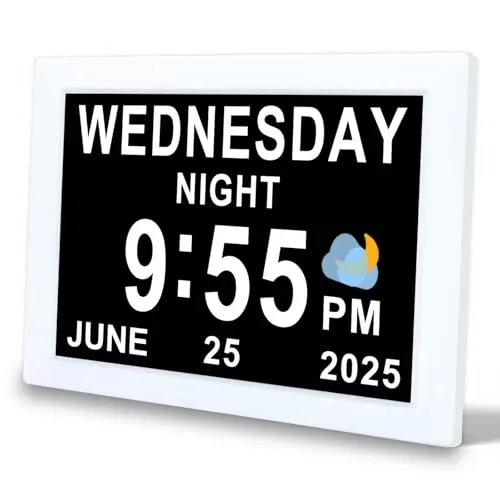
This 8-inch dementia clock is a simple, senior-friendly smart device that quietly supports independence. The large LED display shows the full day, date, and time with bold, high-contrast text and a clear AM/PM indicator—great for aging eyes or anyone experiencing memory loss. The narrow bezel keeps the footprint compact, so it fits well on a bedside table, kitchen counter, or mounted on the wall in a small condo or care home room. You can set up to 12 custom text-based alarms for medication, meals, or appointments, which makes it a helpful voice-free companion to other voice-controlled devices for seniors like Alexa or Google Home for seniors. Auto-dimming means it stays bright enough to read during the day but soft at night. It even supports photo and video playback from an SD card to add familiar faces or calming scenes.
Pros
- Large, high-contrast 8-inch display is easy to read
- Up to 12 text alarms for meds, meals, and routines
- Auto-dimming prevents glare in dark bedrooms or evenings
- Wall-mount or stand gives flexible placement options
Cons
- No built-in voice assistant integration with Alexa or Google Home
VTech CareLine SN5147 Amplified Corded/Cordless Senior Phone System with 90dB Extra-Loud Visual Ringer, Big Buttons & Large Display
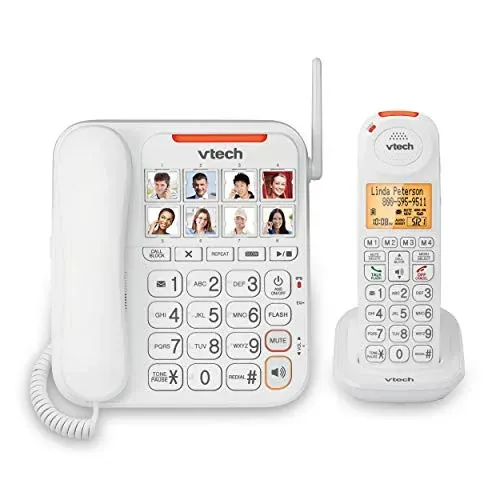
The VTech CareLine SN5147 is a premium amplified phone system that’s ideal for Canadian seniors who want something simple, loud, and reliable without relying on a smartphone. You get both a corded base and a cordless DECT 6.0 handset, so there’s always a backup during power flickers or when the handset isn’t nearby. It’s not a full smart speaker, but it fits nicely into a senior-friendly smart devices setup, especially for those who still prefer traditional phone calls over apps. The 50dB Audio Assist button temporarily boosts volume and sharpens speech clarity, which can be a big help for anyone with hearing loss. Photo dial buttons let you attach pictures to important contacts, so there’s no fumbling with numbers. With extra-loud 90dB ringers, a visual LED ringer, big buttons, and a large, high-contrast display, it’s well suited to low-vision users.
Pros
- Very loud 90dB ringer plus bright visual LED alerts
- Photo dial buttons make calling family incredibly simple
- 50dB Audio Assist greatly improves clarity for hearing-impaired users
- Corded and cordless setup offers flexibility and backup
Cons
- Not a full voice assistant like Alexa or Google Home
Voice-Controlled Devices for Seniors vs Traditional Remotes & Switches: Which Do You Need?
For many Canadian seniors, the choice is between modern voice-controlled devices and sticking with traditional remotes, wall switches, and manual thermostats. Voice-controlled devices for seniors (like Alexa or Google Home for seniors) shine when mobility, arthritis, or vision issues make buttons and tiny text frustrating. Being able to say “turn on the lights” or “call my daughter” is a real safety and convenience boost.
Traditional remotes and switches win on simplicity and reliability. There’s no Wi‑Fi to drop in a snowstorm, no software updates, and virtually no learning curve. They’re also a one-time cost, while smart home devices for elderly users may involve multiple gadgets plus higher internet data plans.
Choose senior-friendly smart devices if the senior is open to a bit of tech learning, needs hands-free help, or lives alone in a larger home or condo. Stick with traditional controls where internet is unreliable (rural Atlantic Canada, cottage country) and simple still works best.
Budget vs Premium: What's the Difference?
Budget voice-activated devices for elderly users in Canada (around $40–$80 on sale) include entry-level Echo Dots. They’re fine for basic voice reminders, weather checks, simple smart plugs, and calling family. For many seniors in apartments or assisted-living suites, these affordable options cover the essentials without a big upfront hit.
Premium options ($220–$370) like the eufy Smart Display E10, VTech CareLine senior phone, and Bose Revolve+ speaker add clearer audio, bigger microphones that hear you over a TV, and screens for video calls, large-font reminders, and camera feeds at the front door. Premium models often feel more “future-proof,” with longer support, nicer build quality, and sometimes better warranties.
If the goal is simple voice timers and light control, budget devices are usually enough. Invest in premium senior-friendly smart devices when hearing or vision is declining, when you want reliable whole-home control, or when this will replace other gadgets (landline, alarm clock, even a radio). Paying extra for clearer sound, sturdier hardware, and better support often works out cheaper than constantly replacing the cheapest gear.
Key Features to Look For
Ease of Use and Senior-Friendly Design
For older Canadians, the most important factor is a simple, forgiving design. Look for voice-activated devices for elderly users with clear microphones, loud speakers, and large physical buttons for volume and mute. A senior-friendly smart device should work with plain language commands like “turn on the light” or “call my daughter,” not just techy phrases. Devices such as Alexa and Google Home for seniors should handle different accents and softer voices, which can be common as people age.
Accessibility and Safety Features
Voice assistants for seniors can double as powerful safety tools when they have the right accessibility features. Look for easy emergency calling or “drop in” style features so family can check in quickly, especially for seniors living alone in smaller communities. Integration with smart home devices for elderly Canadians is key: voice-controlled lights to prevent falls at night, smart locks to avoid fumbling with keys at –20 °C, and simple routines like “goodnight” that shut off lights and lower the thermostat. Visual cues on the device, like light rings or clear displays, help those with hearing loss follow what’s happening.
Sound Quality, Microphone Performance, and Home Layout
Canadian homes vary from compact Toronto condos to sprawling rural houses in Nova Scotia or Saskatchewan. Strong microphones and clear speakers are crucial so seniors don’t strain to hear or be heard. Look for multi-mic arrays that can pick up a normal speaking voice from several metres away, even with a TV playing. In older homes with thick plaster walls, you may need multiple voice-controlled devices for seniors to ensure coverage. Good sound quality is also important for listening to CBC Radio, audiobooks, or family video calls. Adjustable volume and equalizer controls help those with hearing loss fine-tune the sound, especially in echo-prone open-concept spaces.
Reliability, Offline Behaviour, and Power Backup Options
Canadian winters test reliability. Consider how a voice-activated device for elderly users behaves during power outages or internet disruptions, which are more common in rural BC or Northern communities. While most assistants need Wi‑Fi, some can still act as a basic Bluetooth speaker or show the time when offline. Pairing these devices with a small uninterruptible power supply (UPS) can keep critical features like emergency calling and smart lights available through brief outages. For seniors in areas with weaker internet, devices that handle commands efficiently on slower connections will be more dependable day-to-day.
Frequently Asked Questions
Q: What are the best voice-controlled devices for seniors just getting started in Canada?
For a simple first step, the Amazon Echo Dot (newest model) is an excellent entry into voice-controlled devices for seniors. It lets older adults use Alexa to set medication reminders, ask for the weather, check road conditions, or call family hands‑free. Pairing it with senior-friendly smart devices like the Dementia Clock for Seniors creates a very intuitive setup: seniors can ask the Echo Dot for the time, then visually confirm it on the large 8‑inch display. The eufy Smart Display E10 works well as a central control screen so family caregivers in Canada can quickly check cameras, door alerts, or smart lights without navigating complex menus. For those who prefer clearer, richer sound, you can also play Alexa audio through nearby speakers like the Bose SoundLink Revolve+ (Series II) for easier hearing.
Q: How much does it cost to run and use voice-controlled devices for seniors in Canada?
The main costs for voice-controlled devices are upfront purchase and ongoing internet access. Initial device costs range from budget options around $40–$70 to premium models at $220–$370, depending on features needed.
You'll need home Wi-Fi with enough bandwidth—even basic 25 Mbps plans common in rural areas work fine for voice assistants. If you already have internet, there's no additional monthly cost. Voice assistants like Alexa and Google Assistant are free to use with no mandatory subscription fees.
For the VTech CareLine senior phone, you'll need an active landline or VoIP phone service, typically $20–$50 monthly depending on your provider. Optional extras like Amazon Music Unlimited or audiobook subscriptions add $10–$15 monthly, but most seniors can rely on free radio, CBC news briefings, and basic voice features at no additional cost.
Q: Is it worth spending more on premium smart home devices for elderly family members?
Spending a bit more on senior-friendly smart devices can be worthwhile in Canada, especially for safety and independence. For example, combining an Amazon Echo Dot with an Aqara Smart Hub M2 creates a more robust smart home: Alexa can control Aqara‑linked sensors, alarms, and IR‑controlled TVs, which is helpful if a senior has mobility issues. Adding an eufy Smart Display E10 provides a clear, 8‑inch control panel for quick access to cameras and door alerts—useful in multi‑storey homes or townhouses. Premium portable speakers like the Bose SoundLink Revolve+ (Series II) provide clearer sound and better volume than the Echo Dot alone, important for those with mild hearing loss. The Dementia Clock for Seniors and the VTech CareLine SN5147 phone system directly address memory and hearing challenges. Altogether, that extra investment often reduces confusion, missed calls, and safety risks, which can be more valuable than the hardware cost.
Q: How long do smart home devices for elderly users typically last, and when should I replace them?
Most senior-friendly smart devices will last several years in normal Canadian home use. An Amazon Echo Dot and eufy Smart Display E10 typically function well for 4–6 years or more, though software support and feature updates may taper off earlier. The Aqara Smart Hub M2, which mostly sits stationary, can last even longer if kept in a dry, ventilated area. Portable Bluetooth speakers like the Bose SoundLink Revolve+ (Series II) depend more on battery health: expect 3–5 years of strong performance if you avoid leaving them fully discharged in cold garages or vehicles through Canadian winters. Replace devices when they no longer receive critical updates, frequently disconnect from Wi‑Fi, have noticeably degraded battery life, or become too slow or confusing for the senior to use. For clarity tools like the Dementia Clock for Seniors and the VTech CareLine SN5147, consider replacement when displays dim, buttons fail, or text becomes difficult to read.
Q: Will these voice-activated devices for elderly Canadians work with my existing internet and TV setup?
Most Canadian households can use these voice-activated devices for elderly users without major changes. The Amazon Echo Dot and eufy Smart Display E10 only require 2.4 GHz Wi‑Fi, which is standard with Rogers, Bell, Telus, Shaw/Freedom, and most rural ISPs. The Aqara Smart Hub M2 also needs 2.4 GHz Wi‑Fi and does not support Wi‑Fi 6 only networks, so ensure your router broadcasts a legacy 2.4 GHz band (most do by default). To control TVs or cable boxes (Bell Fibe, Rogers Ignite, Telus Optik), the Aqara Smart Hub M2 offers IR remote control, allowing seniors to use voice assistants like Alexa or Google Assistant for basic functions. The Bose speakers connect via Bluetooth to phones, tablets, or some smart displays, so they’re independent of your cable provider. As long as your home has a stable internet connection and a basic smartphone for initial setup, these systems generally fit smoothly into typical Canadian home entertainment setups.
Q: Can I use voice assistants for seniors like Alexa and Google Home with the Aqara Smart Hub M2 and eufy Smart Display E10?
Yes. The Aqara Smart Hub M2 is designed to work with major voice assistants for seniors, including Alexa, Google Assistant, and Apple HomeKit. This means you can control compatible sensors, alarms, or IR‑controlled devices using voice through an Amazon Echo Dot or a Google Home–style setup. This is helpful for seniors who want to say “turn off the TV” or “turn on the hallway light” instead of using remotes. The eufy Smart Display E10 works as a visual control hub, showing smart device status and door alerts on an 8‑inch screen. While the eufy Smart Display E10 itself is primarily a smart display and hub, it fits well into a mixed-ecosystem home: you might use Alexa on an Echo Dot for voice, the eufy Smart Display E10 for touch control, and Aqara Smart Hub M2 to tie together security and automations.
Q: What’s the difference between using a smart display like the eufy Smart Display E10 and a dedicated Dementia Clock for Seniors?
The eufy Smart Display E10 is an 8‑inch smart home hub with multi‑view capability (four views on one screen), instant door alerts, and one‑tap control, making it ideal as a central command centre for caregivers and tech‑comfortable seniors. It can show camera feeds, smart device status, and daily event summaries. The Dementia Clock for Seniors, also 8 inches, is purpose‑built for clarity: it offers an extra‑large display, multiple calendar styles, 12 alarm reminders, auto‑dimming, and support for 10 languages. It’s designed to reduce confusion about time of day, date, and appointments, crucial for dementia or memory issues. Pairing them works well: place the Dementia Clock in the bedroom or kitchen for constant orientation, and use the eufy Smart Display E10 in a central area (like the living room) for managing entry alerts, cameras, and other smart devices.
Q: What Wi‑Fi and technical specs do I need in Canada for these senior-friendly smart devices to work well?
Most Canadian internet plans can support these senior-friendly smart devices. A stable 2.4 GHz Wi‑Fi network is essential for the Amazon Echo Dot, Aqara Smart Hub M2, eufy Smart Display E10, and Dementia Clock for Seniors (if using any connected features). Even basic 15–25 Mbps plans common in rural areas are usually sufficient if you’re not streaming multiple 4K videos simultaneously. Ensure your router is centrally located; older homes with plaster walls may benefit from a mesh system, but it’s not mandatory. The Aqara Smart Hub M2 specifically requires 2.4 GHz and won’t work on Wi‑Fi 6–only routers, so check your ISP modem settings. Bluetooth speakers like the Bose SoundLink Revolve+ (Series II) don’t need Wi‑Fi, just Bluetooth on a phone or tablet. For best performance, keep devices within 8–10 metres of the router or paired phone, with minimal walls between.
Q: How can I set up a simple, easy-to-use voice assistant system for an elderly parent in Canada?
A straightforward setup for Canadian seniors starts with an Amazon Echo Dot placed in a central room—often the kitchen or living room. During setup, use a Canadian region account so weather, news, and units (Celsius, kilometres) are correct. Add key voice routines: medication reminders, “good morning” summaries, and “call [name]” voice contacts. Pair it with a Dementia Clock for Seniors in the bedroom or hallway so time, date, and alarms are always visible in large text. If safety and door monitoring are priorities, add an eufy Smart Display E10 near the main entrance to show instant door alerts and daily event reports. The Aqara Smart Hub M2 can later expand the system with sensors and IR TV control. For better hearing, consider connecting a Bose SoundLink Revolve+ (Series II) to make Alexa responses and calls clearer, especially for seniors with mild hearing loss.
Q: What’s a good way to combine voice assistants, clocks, and phones to support aging in place in Canada?
A strong aging-in-place setup in a Canadian home often combines multiple senior-focused devices. Use an Amazon Echo Dot in main living areas for voice assistants: hands‑free calls, timers for cooking, medication reminders, and weather/road condition checks during winter. Place a Dementia Clock for Seniors in high-traffic areas (kitchen, hallway) to reduce confusion about date, day, and time, especially during long winter evenings when it gets dark early. Add the VTech CareLine SN5147 as the primary phone system, giving amplified sound, big buttons, and a loud visual ringer that’s easy to see and hear. For caregivers, the eufy Smart Display E10 can provide a central dashboard for door alerts and daily reports. The Aqara Smart Hub M2 can expand safety with alarms and automations. Together, these voice-controlled devices for seniors create layers of support without overwhelming them with a single overly complex solution.
Final Thoughts: Making the Right Choice for Canadian Conditions
Choosing the right voice-controlled device for Canadian seniors comes down to safety, simplicity, and day‑to‑day comfort. For most older adults from Halifax to Vancouver Island, a hands-free way to call family, play music, or get medication reminders can make staying independent much easier.
For that reason, the Amazon Echo Dot (newest model) is our top pick for most Canadian seniors. Its clear voice recognition, simple “Alexa” wake word, and strong integration with smart home features make it ideal for tasks like turning on lights during dark winters or making quick voice calls any time of day. It’s especially useful for seniors who live alone and want an easy way to reach loved ones without fumbling for a phone.
If rich, room-filling sound is a priority—perhaps for a senior who loves music, radio, or audiobooks—the Bose SoundLink Revolve+ (Series II) Port offers 360‑degree audio that’s excellent in a condo living room or small bungalow.
For seniors who benefit from visual cues alongside voice control, devices with screens like the eufy Smart Display E10 offer more tailored accessibility features, combining spoken commands with large, easy-to-read displays.
Before making your final decision, think about where the device will be used, Wi‑Fi reliability, and how comfortable the senior is with new technology. If possible, test the wake word and volume levels in a real setting, and involve family members in setting up emergency contacts and daily routines.
Take the next step by choosing one device to start with and trying it for everyday tasks over a few weeks. With the right voice-controlled companion, Canadian seniors can stay connected, confident, and ready to enjoy the next chapter with a bit more ease and independence.